Notice when your LLM app gets quietly worse.
DriftWatch scores five quality signals on a running LLM app and raises an alert when they move together. It tells you that quality moved, not always why.
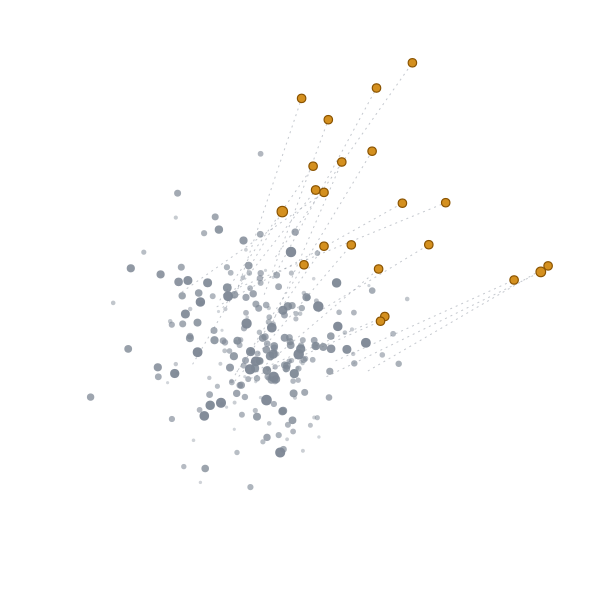
What does DriftWatch measure?
Embedding drift
Turns each answer into an embedding, a vector that captures its meaning, and measures how far recent answers have moved from a baseline.
Self-consistency
Asks the same question several times and checks whether the answers still agree with each other.
Canary accuracy
Runs canary probes, a fixed set of questions with known answers, on a schedule and tracks how many come back right.
Judge trend
A second model, the LLM judge, grades a sample of answers against a rubric. DriftWatch watches the trend, not any single grade.
Hallucination score
Compares repeated answers to the same question and measures how much their wording disagrees. A word-overlap heuristic, not fact checking.
How can I try it right now?
Open the live demo, push the bot into drift with one of the scenarios, and watch the signals react. Create an account to keep your place for what ships next.
How do I monitor my own app?
Step 1
Install
pip install "driftwatch-llm[agent]"Install the package into the same Python environment as your app. The [agent] part adds what is needed to compute scores on your machine.
Step 2
Link your project
driftwatch initSign in through the browser and link this folder to a DriftWatch project.
Step 3
Open the dashboard
driftwatch dashboardSee live scores on your machine, or log in on the website to see the same data.
Step 4
Optional: grade a sample
driftwatch judge enableTurn on the judge to grade a small, redacted sample of your responses with the free allowance. It shows exactly what is sent before it starts.
Local or web: where should I watch it?
On your machine
A small agent runs alongside your app and keeps raw prompts and responses local. Scores sync to your account.
From the web
Connect a model from your dashboard and DriftWatch runs scheduled checks against it.
What happens to my API keys?
Start free
A small allowance on our provider key, enough to try DriftWatch on a real app.
Bring your own key
Kept in your system keychain on your machine; it never leaves it.
Keys in the cloud
If you connect a model from the web, the key is stored encrypted and is never shown again.
Questions
What is DriftWatch?
DriftWatch is an LLM drift monitor: it watches a running LLM app for quality that drops without any error or crash. It scores five signals, including embedding drift and canary accuracy, combines them into one score and alerts when that score crosses a threshold. It shows that quality moved, though not always why.
How does DriftWatch detect LLM quality regression?
It watches several signals at once instead of trusting one metric. Embedding drift shows answers changing in meaning, canary probes catch wrong answers to known questions, and an LLM judge grades a sample against a rubric. When the combined score crosses a threshold, you get an alert. The alert says something moved; finding the cause is still your job.
Can DriftWatch detect LLM hallucinations?
Partly. The hallucination score asks the same question several times and measures how much the answers' wording disagrees. It is a self-consistency heuristic based on word overlap, not fact checking. A model that gives the same wrong answer every time can pass it, so treat a clean score as weak evidence.
How do I monitor my own LLM app with DriftWatch?
Install the package with pip install driftwatch-llm[agent], then run driftwatch init inside your project folder. It signs you in through the browser, creates a project and stores its key in your system keychain. From then on, a small background agent starts whenever your Python app runs. Run driftwatch dashboard to see it.
Can I see the dashboard without the command line?
Yes. Every score the local agent computes syncs to your DriftWatch account, so the same charts appear on the website after you log in. If you would rather skip the local install entirely, connect your model from the web dashboard and DriftWatch runs its scheduled checks against it from the cloud.
Which signals does the local agent measure today?
One: embedding drift, meaning how far recent responses have moved from a baseline of your app's first 200. It is computed on your machine and works with the OpenAI, Anthropic, Groq and Google GenAI Python SDKs, streaming included. The other signals need extra model calls and keys, and embedding drift alone raises no alerts yet.
What does the free allowance send, and who sees it?
With the free allowance, a redacted sample of a response (emails, keys and numbers masked, cut to 1500 characters) goes to the DriftWatch relay, which asks a small language model to grade it and keeps nothing. It is off until you run driftwatch judge enable, and you get 50 graded samples before it stops.
What happens to the API key I connect from the web?
Your key travels over an encrypted connection, is checked once with your provider, then encrypted with a key that only our scheduled runner holds, so the website and database cannot read it. The runner uses it for fixed questions on your schedule and budget. You pay your provider for those calls, and you can delete the key any time.
Who pays for the LLM calls DriftWatch makes?
Each account gets a small free allowance on our key, enough to try DriftWatch on a real app. When it runs out, add your own provider key and keep going on your own account with your provider. You can also bring your own key from the start and skip the allowance entirely if you would rather not use ours.
Does DriftWatch send my prompts and responses to the cloud?
Not by default. Scores are computed on your machine and only numbers reach your account. Prompts are never read. The one exception is the optional judge: once you turn it on, a small sample of responses, with emails and keys masked first, goes to the model provider you chose.
How does the live demo work?
The demo is a small question-answering bot that DriftWatch monitors in real time. Buttons such as Simulate model downgrade and Simulate prompt injection creep push it into drift, and you can watch the five signals and the combined score react. Every visitor shares the same demo, so you may see other people's runs.
Is the live demo private?
No. Every visitor shares the demo, and scenarios you trigger are visible to others. Any question you type goes through the demo server to an LLM provider so the bot can answer it. Do not type anything sensitive into the demo, such as personal data, passwords or confidential company details.
What can I do with a DriftWatch account today?
An account lets you create projects, make API keys and send events to a project with a plain HTTP call. Your scores update live on your dashboard. You can export your data or delete your account yourself in Settings. The live demo needs no account.
What are the limits of DriftWatch?
DriftWatch cannot prove your model is correct, and it cannot always explain why quality changed. It watches statistical signals and a sampled LLM judge, so a quiet score means nothing obvious moved, not that nothing is wrong. Treat an alert as a reason to look closer, then read real examples yourself.